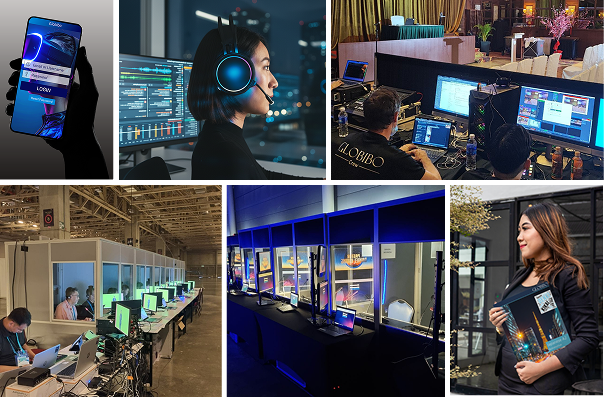
Translation equipment is pivotal in creating inclusive and effective learning environments in schools with diverse student populations. This article provides an in-depth exploration of various types of translation equipment suitable for educational settings, their technical specifications, applications, and best practices for implementation. The goal is to offer a comprehensive understanding of how these tools can support multilingual education and enhance communication within the school community.
In an increasingly globalized world, schools are becoming more diverse, often encompassing students from various linguistic backgrounds. Effective communication is crucial for academic success and fostering an inclusive environment. Translation equipment is designed to bridge language barriers, enabling students, teachers, and parents to interact seamlessly. This article delves into the types of translation equipment available, their features, and how they can be utilized to improve educational experiences.
Types of Translation Equipment
1. Simultaneous Interpretation Systems
Simultaneous interpretation systems are essential for real-time translation during live events, lectures, and conferences. These systems are particularly useful in large classrooms or during school-wide events where multiple languages are spoken.
Components and Technical Specifications
-
Transmitters and Receivers:
- Transmitters: These are used by interpreters or speakers to broadcast audio. They may be worn as body packs or integrated into microphones.
- Receivers: Distributed to the audience, these devices receive the transmitted audio and provide it to users via headsets.
- Frequency Range: Typically operates in the 72-76 MHz or 1.9 GHz range for digital systems.
- Battery Life: Generally lasts 8-12 hours, depending on the device and usage.
- Range: Effective up to 300 meters.
-
Headsets and Microphones:
- Headsets: Ensure clear audio reception for users. High-quality headsets minimize background noise and improve comprehension.
- Microphones: Used by interpreters to capture and transmit audio. Lavalier (lapel) microphones are commonly used for their convenience.
-
Control Units:
- Functions: Manage channel selection, volume levels, and overall audio clarity.
- Features: Often include digital displays and adjustable settings to customize audio output.
Applications
- Large Classrooms: Enables students to hear the lecture in their preferred language.
- International Conferences: Facilitates communication among participants from different linguistic backgrounds.
- Multilingual Workshops: Assists in providing equitable learning opportunities for all attendees.
2. Portable Translation Devices

Portable translation devices are compact and versatile, suitable for smaller groups or individual use. These devices are designed for ease of use and mobility, making them ideal for various classroom settings and events.
Features and Technical Specifications
-
Voice Recognition:
- Function: Converts spoken language into text or audio in a different language.
- Accuracy: Varies based on the device and language pair.
-
Touchscreen Interface:
- Function: Allows users to select languages, adjust settings, and manage translations.
- Size: Typically ranges from 4 to 7 inches.
-
Offline Capability:
- Function: Provides translation without requiring an internet connection.
- Storage: Usually between 8 to 32 GB for storing language databases.
Applications
- Field Trips: Assists students and teachers in communicating with local guides and facilitators.
- Parent-Teacher Meetings: Helps non-native speaking parents understand discussions and provide feedback.
- Small Group Discussions: Facilitates communication in group settings where a full-scale system is not necessary.
3. Video Remote Interpretation (VRI) Systems

VRI systems use video conferencing technology to provide remote interpretation services. These systems are valuable in scenarios where on-site interpreters are unavailable or impractical.
Components and Technical Specifications
-
Cameras and Microphones:
- Cameras: High-definition (HD) cameras capture clear video of the interpreter and participants.
- Microphones: Ensure clear audio capture and transmission.
-
Computers or Tablets:
- Function: Used to connect with remote interpreters through video conferencing platforms.
- Specifications: Should have sufficient processing power and connectivity options.
-
Internet Connection:
- Requirement: A stable high-speed internet connection is essential for effective communication.
- Speed: Minimum of 1 Mbps upload and download speed is recommended.
Applications
- Remote Areas: Provides access to interpretation services in locations with limited local resources.
- On-Demand Needs: Allows for immediate access to interpretation services as required.
- Specialized Consultations: Facilitates communication for specialized subjects where local expertise may be lacking.
4. Automated Translation Software
Automated translation software utilizes artificial intelligence (AI) and machine learning to provide instant translations. This software is increasingly integrated into various educational tools and platforms.
Features and Technical Specifications
-
Machine Learning:
- Function: Continuously improves translation accuracy based on user interactions and feedback.
- Updates: Regular updates to enhance language models and expand language support.
-
Text and Voice Translation:
- Function: Supports both written and spoken language translation.
- Integration: Often integrated with other educational software and platforms.
-
Language Database:
- Support: Typically offers translation for over 100 languages.
- Accuracy: Generally ranges from 70% to 90%, depending on the language pair and context.
Applications
- Classroom Materials: Translates textbooks, worksheets, and other educational resources.
- Homework Assignments: Assists students in understanding and completing assignments in their native language.
- Communication with Parents: Facilitates effective communication with non-native speaking parents and guardians.
Choosing the Right Equipment

Selecting the appropriate translation equipment for a school involves evaluating various factors to ensure that the chosen tools meet the institution’s needs and budget. Here are key considerations:
Factors to Consider
-
Audience Size:
- Large Groups: Simultaneous interpretation systems are ideal for large audiences.
- Small Groups: Portable devices may be more suitable for smaller, more flexible settings.
-
Translation Needs:
- Real-Time Translation: Simultaneous interpretation systems or VRI may be required.
- On-The-Go Translation: Portable devices or automated translation software can be more practical.
-
Budget:
- Initial Costs: Consider the upfront investment in equipment.
- Ongoing Maintenance: Factor in costs for maintenance, updates, and support.
Best Practices for Implementation
-
Training:
- Staff Training: Ensure that teachers and staff are proficient in using the equipment.
- Student Orientation: Provide guidance for students on how to use translation tools effectively.
-
Regular Maintenance:
- Equipment Checks: Schedule regular maintenance to ensure optimal performance.
- Software Updates: Keep software and firmware updated to address bugs and enhance functionality.
-
Feedback Mechanism:
- User Feedback: Collect feedback from users to assess the effectiveness of the equipment.
- Continuous Improvement: Use feedback to make adjustments and improvements to the translation process.
Table of Translation Equipment Specifications
| Equipment Type | Frequency Range | Battery Life | Language Support | Resolution | Internet Speed |
| Simultaneous Interpretation | 72-76 MHz / 1.9 GHz | 8-12 hours | N/A | N/A | N/A |
| Portable Translation Device | N/A | 6-10 hours | 30-50 languages | N/A | N/A |
| Video Remote Interpretation | N/A | N/A | N/A | 720p / 1080p HD | 1 Mbps |
| Automated Translation Software | N/A | N/A | 100+ languages | N/A | N/A |
Conclusion
Translation equipment is an essential component of modern educational environments, particularly in schools with diverse student populations. By selecting the right tools and implementing best practices, educational institutions can facilitate effective communication, support multilingual learning, and foster an inclusive atmosphere. Whether through simultaneous interpretation systems, portable devices, VRI systems, or automated translation software, these tools play a crucial role in bridging language gaps and enhancing the educational experience for all stakeholders.
Academic References for Translation Equipment
- The Application of Mobile Devices in the Translation Classroom.
- [PDF] Asymmetries in the teaching of translation technology
- Teaching translation courses, back to basics, desirable or not?
- The Translation Procedures on School Notices Board at SMAN 3 Kota Serang
- Exploring audiovisual translation as a didactic tool in the secondary school foreign language classroom
- [PDF] “Translation Makes Something Happen.” Why Include Translation in Secondary School Programmes
- AN ANALYSIS OF THE TRANSLATION TECHNIQUE USED BY STUDENT IN TRANSLATING POETRY TEXT ENTITLED “EQUIPMENT‘BY EDGAR ALBERT GUEST
- Translating School Statistics for the Public1
- Digital translation tools in the process of teaching of foreign languages
- Classroom acoustical screening survey worksheet: translation and cultural adaptation to Brazilian Portuguese